

A magnetic switch responds to a magnetic field to register input. In keyboard design, this non-contact method supports stable signal detection and a more consistent feel across repeated keystrokes.
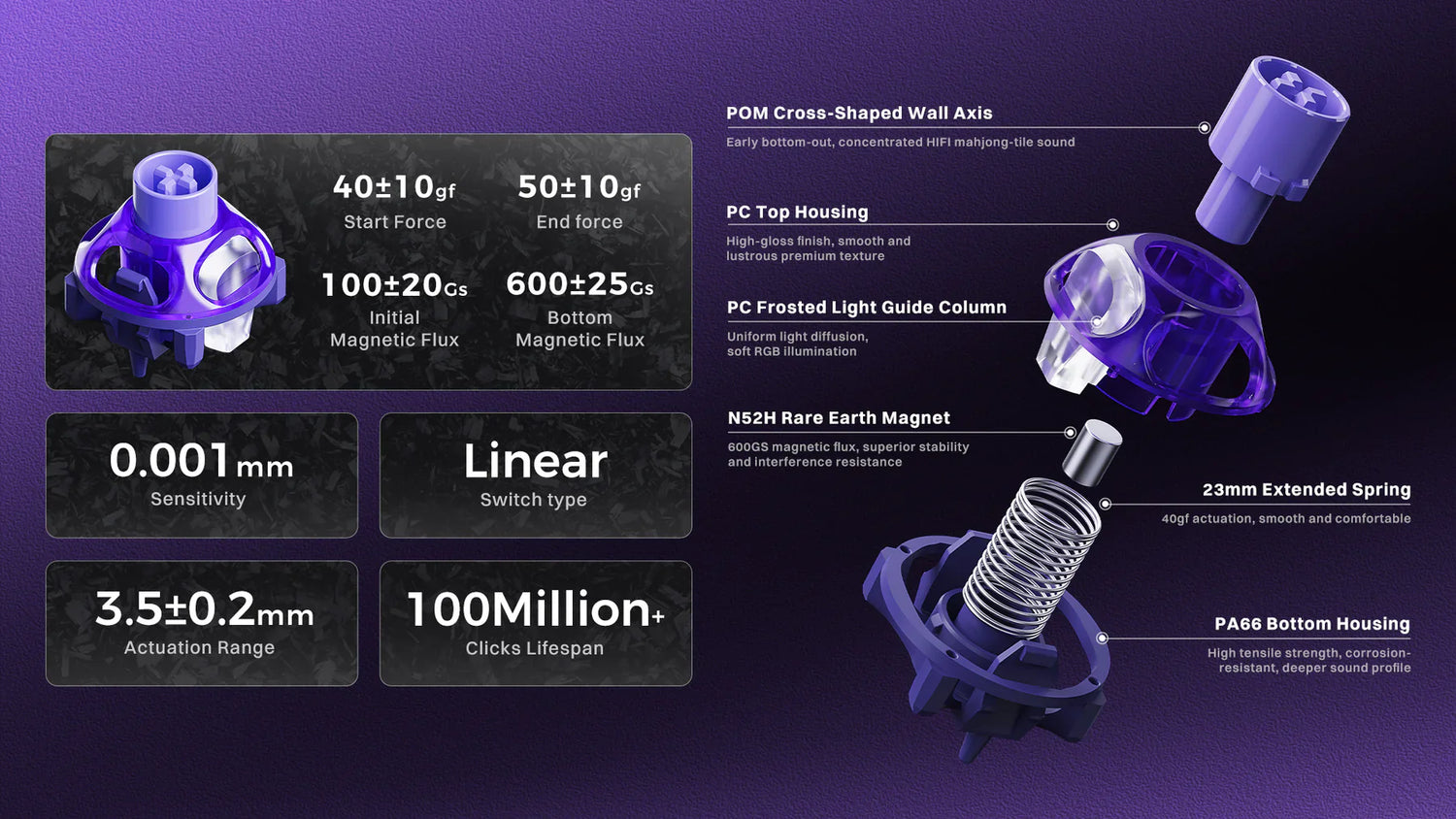
The GravaStar UFO Magnetic Switch uses magnetic sensing inside an exposed skeletal housing. Its structure gives the switch a more distinctive form, and the Hall effect platform supports precise actuation with less internal wear.
Keyboards built around magnetic sensing can maintain a consistent, stable response during repeated input and rapid trigger actuation.
How Magnetic Switches Work

Magnetic switches replace physical contact with Hall effect sensing to register input. The design removes conventional metal contact from the switching process and establishes a contactless sensing method built for faster signal response and more consistent operation.
The Hall Effect Mechanism
The Hall effect mechanism reads switch travel through a magnetic field change instead of a metal contact. Inside the switch, an N52H rare-earth neodymium magnet moves over the printed circuit board sensor as the stem travels.
On a 1.2 mm printed circuit board, the initial magnetic flux is 105 ± 20 Gs. At bottom-out, the magnetic flux reaches 800 ± 50 Gs. The controller reads those Gs values as voltage changes, then translates each change into an exact vertical position.
Precise signal tracking supports higher precision, more controlled actuation, and a more stable input path during repeated use. Accurate position data improves switch performance across the full stroke.
Analog Data vs. Binary Signals
Traditional switches read input as a binary event. The circuit remains off until physical contact closes it, then the signal turns on at one fixed point in the keystroke. Binary input gives each key one decision point, so movement above or below that point does not change the result.
A Hall-effect switch monitors the full 3.50±0.2 mm travel path in 0.1 mm increments, producing analog position data across the stroke. An analog axis allows multiple programmable trigger points on one key.
A shallow press can activate one command, while a deeper press can activate another. Lower latency and finer control benefit gaming and typing alike.
Eliminating Mechanical Noise
A Hall effect switch removes leaf bounce because no metal contacts strike during input. The signal output stays clean from the start, and the firmware avoids the debounce delay common to mechanical keyboards.
Faster registration improves control under repeated presses and reduces timing variation in high-speed use. Contactless sensing removes the friction that shortens switch life in conventional designs. GravaStar rates the design for over 100 million cycles, providing the build with greater durability under heavy use.
Sound changes as well. The switch produces a more controlled thock without the chatter associated with unstable contact, supporting a cleaner response and more dependable magnetic precision over sustained use.
GravaStar’s UFO Magnetic Switch

The GravaStar UFO Magnetic Switch breaks from the closed-box switch format, featuring an exposed skeletal frame designed for stability and visual impact. The design introduces a more futuristic switch form, with hardware built to reduce housing flex and support cleaner switch alignment.
360° Circular Dual-Rail Skeletal Architecture
Most switches rely on a sealed plastic housing that traps air and limits reinforcement around high-load points. The UFO switch uses a 360° skeletal frame with circular dual-rail support, removing excess material and strengthening the motion-control areas.
Downward force spreads more evenly across the switch body, and pressure stays balanced during off-center presses. Two internal rails keep the stem on a strict vertical path, preventing it from drifting under angled input.
The result is lower binding and less sticking. Open architecture changes structural behavior and creates a more controlled key path under load.
Structural Innovation for Stability
Traditional stems use a cross-shaped profile, and that geometry leaves room for lateral movement inside the housing. A precision circular wall increases the contact surface area around the stem and creates a more controlled guide path under load.
More surface engagement helps reduce wobble and creates a firmer, more stable feel during fast input. POM provides the switch with a low-friction surface, enabling smoother linear travel with less drag during repeated presses.
The material choice suits custom builds with heavier keycaps or a rigid plate that increases the downward load. The result feels cleaner, more controlled and more thocky in use.
The Hardware Ecosystem
The hardware ecosystem uses a standard 5-pin mount compatible with Hall-effect printed circuit boards. Hot-swappable support lets users install or remove each switch without soldering, making side-by-side test setups easier on a live board.
Each pack includes a dedicated GravaStar switch puller sized for the UFO housing, because the exposed frame requires a tool that matches its shape. The mounting format remains compatible with many current layouts and supports wider use of custom keyboards.
A 12-month limited warranty covers manufacturing defects in the N52H magnets and housing structure. Clear support terms strengthen the product description for buyers and long-term hardware confidence.
Adjustable Actuation and Rapid Trigger Logic
Standard mechanical switches depend on fixed metal contacts to register input. The GravaStar UFO switch moves actuation control into software, enabling rapid trigger actuation and programmable responses that conventional hardware cannot reproduce.
Micro-Level Precision Control
Mechanical switches carry a larger pre-travel window before input begins, leaving a wider dead zone at the top of the stroke. The UFO magnetic switch reads movement in 0.001 mm to 0.005 mm steps, allowing the sensor to detect motion as small as a human hair.
N52H rare-earth magnets generate a 600GS field, giving the PCB a stronger and cleaner signal across tiny travel changes. Higher signal fidelity reduces jitter and prevents dropouts during fast input. In direct comparison with lower-grade magnetic systems, the result feels more exact and more immediate. For gamers, that level of control creates a more original input experience.
Variable Actuation Thresholds
Variable actuation thresholds let users place the trigger point anywhere across the 3.50±0.2 mm travel range. Software control replaces fixed-contact behavior, and the switch can respond at 0.1mm for fast game input or deeper into the stroke for typing control.
N52H rare-earth neodymium magnets help keep those thresholds stable during on-the-fly calibration, reducing signal jitter during profile changes. The 0.005 mm adjustment granularity pushes sensitivity far beyond standard magnetic designs.
The hardware and software combine to deliver an exact response across different profiles, giving users tighter control over how each key reacts to changing input demands.
Rapid Trigger (RT) Mechanics
Rapid trigger changes reset behavior by removing the fixed return point found in standard switches. The switch deactivates the moment upward movement begins, even at 0.01 mm, and repeated input can restart with almost no delay. In tactical shooters, a faster reset helps players stop movement sooner and re-enter aim control with tighter timing.
Counter-strafing benefits most because the key no longer has to wait for a full mechanical reset before input clears. For competitive gamers, the result feels sharper and more immediate. On a performance-focused gaming keyboard, rapid movement control gains a more exact response window during close-range fights and strafing duels online.
How the Force Curve and Resistance Feel
A magnetic switch changes the force felt by removing the contact leaf from the keystroke path. Resistance comes mainly from the internal spring, giving the stroke a cleaner, more even response with less drag and a more controlled sense of motion.
Linear Force Dynamics
The GravaStar UFO switch operates as a linear magnetic switch with an operation force of 40±10gf. That medium-light weighting balances fast game input with lower strain during longer typing sessions.
No tactile bump interrupts the stroke, and no click jacket changes resistance during travel. The result is a smooth diagonal force curve from top travel to bottom-out. Pressure builds steadily, giving each press a more predictable feel across the full 3.5mm stroke.
Consistent resistance helps users control input with less fatigue over time. Cleaner motion reduces scratches, and the switch maintains a more even response during sustained use.
The 23mm Extended Spring
The 23mm extended spring plays a major role in how the GravaStar UFO switch feels under the finger. Standard switches often use 14mm to 15mm springs, and shorter lengths can create a softer opening press with sharper resistance near bottom-out.
The longer spring in the UFO switch starts under pre-compression inside the housing, creating a more even force curve across the stroke. Top travel feels closer to bottom-out in resistance, giving the press a steadier character.
Rebounds feel faster as well. The key returns with more snap, helping repeat inputs feel cleaner and making it easier to maintain typing rhythm.
Force Curve Comparison
A standard Red mechanical switch builds resistance as the stem pushes past a metal contact leaf. Contact pressure introduces a small force spike, and that change is what users often feel during travel.
The GravaStar UFO magnetic switch removes that contact point and replaces it with magnetic sensing, so the stroke follows a cleaner force path from top travel to bottom-out. N52H magnets read movement without touching the printed circuit board, keeping the 3.50±0.2mm stroke smooth and consistent. Friction stays lower across the press, and the switch feels lighter than its 40gf rating suggests. The result is a more refined descent with fewer scratches.
What Gravastar’s UFO Magnetic Switch Can Do in Practice
The GravaStar UFO switch adapts to real workloads through firmware-driven control and contactless sensing. Users can tune rapid trigger actuation for faster game inputs or increase trigger depth for steadier, high-volume typing without changing hardware on a single board.
Competitive Gaming Edge
Competitive play depends on signal stability under repeated, high-speed input. The UFO switch uses N52H magnets to maintain a consistent 600 GS magnetic flux density, providing a cleaner signal during vibration-heavy play and reducing unintended deactivation.
Lower-grade magnetic designs can lose signal consistency under the same conditions. Support for 8,000Hz polling lets the switch feed a clean contactless signal into a fast gaming PCB with minimal delay.
Response time can reach 0.125 ms when the board supports that bandwidth. For competitive gamers, the result is tighter timing, cleaner stop-start input, and a bolder performance profile during aim-critical movement and rapid-fire actions.
Professional Typing and Coding
Professional typing and coding place more value on consistency than raw speed. A 40 gf linear weighting keeps resistance light through the stroke, and the contactless design removes the break force that often makes tactile switches feel more abrupt over long sessions.
Lower impact helps reduce finger strain during extended work and supports a steadier typing rhythm across large blocks of text or code. Users can set a deeper trigger point between 2.5 mm and 3.0 mm, reducing accidental inputs during crowded hand placement.
Deeper settings help separate intentional presses from light grazes, even on boards with heavier keycaps or rigid aluminum cases.
How Does the UFO Switch Sound and Feel?
The GravaStar UFO Magnetic Switch produces a more controlled, thocky sound with smoother travel through the stroke. An open housing changes how each press resonates, and lower internal friction gives the switch a cleaner glide under repeated input.
Acoustic Optimization
Magnetic switches often sound thin because light housings and trapped air sharpen the bottom-out impact. The UFO switch uses a sealed lower housing and a dense outer frame to produce a deeper, more controlled sound.
Air moves more freely through the upper structure during the downstroke, reducing the cushion effect that can soften impact and blur response. Cleaner airflow keeps resistance more even across the press and preserves a firmer acoustic character.
Bottom-out sounds more solid than brittle, and the return motion stays cleaner under fast repetition. For enthusiasts seeking a refined sound comparison, the result leans toward a muted, high-density profile rather than a hollow plastic report.
Tactile Consistency
Tactile consistency depends on stem material, lubrication quality, and rail control through the full stroke. The UFO switch uses a POM stem with high stiffness and low friction, providing the press with a smoother, more even linear path over time.
POM’s self-lubricating surface helps the contact points polish over time rather than wear down, resulting in a smoother feel. Factory lubrication improves that response from the first press. Lubricant is applied to the 23mm spring and internal rail path to reduce metallic ping and uneven drag.
The result is a cleaner keystroke with steadier rebound, lower noise, and a more settled feel across sustained input.
Where Does the UFO Switch Work Best?
The UFO switch works best in settings that reward fast signal response and controlled travel. Competitive play benefits from tighter reset behavior, and precision-focused workloads gain cleaner input control from contactless sensing tuned for repeatable, high-speed execution.
Competitive E-Sports and Tactical Shooters
Competitive e-sports and tactical shooters expose every delay in switch reset and signal registration. The UFO switch suits that environment because rapid trigger logic clears movement input the moment upward travel begins, letting counter-strafes stop faster in Valorant or Counter-Strike 2.
Earlier movement release helps shots stabilize sooner and tightens peeking control during angle fights. Rhythm games and fighting titles place different demands on the hardware. Repeated presses need a fast rebound and stable signal output.
The 23mm spring returns the cap with more speed, and the 600GS magnetic field helps maintain clean registration during dense input chains without ghosting or dropouts.
Professional Coding and Data Entry
Professional coding and data entry reward accuracy, consistency, and lower hand strain over long sessions. Variable actuation lets users set a deeper 3.0mm trigger point, reducing accidental inputs caused by light grazes or crowded finger placement.
Deeper activation helps separate deliberate presses from unintended movement, giving developers cleaner syntax entry and fewer correction breaks. A 40 gf linear weight keeps resistance light throughout the stroke without abrupt break force.
The POM stem maintains smoother travel with lower friction, supporting a steadier typing rhythm across extended workloads. A controlled housing path keeps motion firm under pressure, helping users sustain speed with fewer disruptions and better input confidence.
How Long Does the GravaStar UFO Switch Last?
The GravaStar UFO Magnetic Switch is rated for over 100 million cycles. No metal leaf wears down over time, so common contact failure points stay out of the signal path.
N52H rare-earth neodymium magnets maintain a stable 600GS magnetic field across extended use, helping the sensor hold steady output without drift. The self-lubricating POM stem becomes smoother as surfaces wear in, keeping linear travel cleaner across repeated presses.
The GravaStar UFO Magnetic Switch stands out as more than just a durable Hall effect option. It combines contactless longevity with fast, precise actuation, a smoother linear feel, and a more controlled sound profile, making it a strong fit for users who want one switch that can handle both competitive gaming and long daily typing sessions.
What Is a Magnetic Switch? | FAQs
Do UFO switches work on standard keyboards or only Hall effect boards?
UFO switches may fit many 5-pin hot-swappable boards, but full functionality requires a Hall-effect-compatible PCB and firmware. Features like adjustable actuation and Rapid Trigger will not work properly on a standard mechanical board.
Is there any collision between the UFO switch and other keycaps?
No, the UFO switch does not collide with other keycaps during normal use. It supports standard MX-style keycaps, and you can install compatible sets without clearance issues.
Can you adjust the GravaStar UFO Magnetic Switch for both gaming and typing?
Yes. One of the main advantages of the UFO Magnetic Switch is that its actuation point can be adjusted through software across the full travel range. That means you can set a very shallow trigger point for faster gaming input, or move actuation deeper for typing and coding to reduce accidental presses and create a more controlled feel.
Does the GravaStar UFO Magnetic Switch require less maintenance than a mechanical switch?
In general, yes. Because the UFO switch uses contactless Hall effect sensing, it avoids the metal contact wear and leaf bounce that affect traditional mechanical switches over time. The POM stem and contactless design help maintain smoother travel and more stable performance across extended use, which supports better long-term consistency with fewer common mechanical failure points.

Leave a comment
This site is protected by hCaptcha and the hCaptcha Privacy Policy and Terms of Service apply.